
Is a landlord-first platform good for commercial tenants?
Most commercial real estate software was built to serve landlords: managing rent collection, maintenance, and tenant screening. Commercial tenants have different needs: tracking lease obligations, managing ASC 842 compliance, and giving real estate and finance teams a shared view of the same data. Landlord-first platforms can be configured to serve tenants, but the workarounds required to make them work are often where compliance errors and missed critical dates originate. Software purpose-built for commercial tenants handles these workflows natively, without configuration workarounds.
A finance or real estate professional at a multi-location company gets sold on a well-known lease platform. It handles everything, they were told. Eighteen months in, the ASC 842 module requires exporting data to a separate spreadsheet. Critical date alerts go to the wrong person. The real estate team can't see what finance is doing, and finance can't verify the lease data without calling someone in real estate.
The platform works. It just wasn't built for them.
The reason isn't a failed implementation or a misconfigured workflow. It's architecture. The platform was designed for a different customer with different priorities. Understanding that distinction is the first step to knowing what to look for when you're evaluating a switch.
What's the difference between software built for landlords and software built for tenants?
Landlord-first software is designed around the landlord's workflow: collecting rent, managing properties, screening tenants, and tracking maintenance requests. Tenant-first software is designed around the tenant's workflow: managing lease obligations, tracking critical dates, generating ASC 842 journal entries, and giving real estate and finance teams a shared data source.
The underlying data model, default reports, and user workflows are fundamentally different between the two. Consider what each party needs most from a lease platform:
A landlord needs to know who owes them money and when. They need rent roll reports, vacancy tracking, and maintenance ticketing. Their primary relationship with a lease is as the party receiving obligations from someone else.
A commercial tenant needs to know what they owe, when they owe it, and whether it's been accounted for correctly. They need critical date alerts, ASC 842 amortization schedules, renewal tracking, and audit-ready reporting. Their primary relationship with a lease is as the party responsible for obligations, compliance, and strategic decisions about their real estate footprint.
These two lists barely overlap. A platform built to serve one rarely serves the other well without significant workarounds.
Is a landlord-first platform good for tenants or just landlords?
Landlord-first platforms can be used by tenants, but the tenant use case is typically a secondary module or an add-on rather than the core product. That means the workflows tenants rely on most, including ASC 842 lease accounting, critical date management, and portfolio-level reporting for finance, are often configured workarounds rather than native features.
The gap shows up most visibly in three places:
ASC 842 calculations. Most landlord-first platforms treat accounting as a reporting layer rather than a core module. Calculating ROU assets, lease liabilities, amortization schedules, and journal entries from live lease data requires either a manual export to a separate system or a third-party integration. When a lease is amended, the recalculation doesn't happen automatically. Finance ends up rebuilding schedules in Excel and reconciling back to the platform.
Critical date alerts. Landlord-first platforms build alert systems around the landlord's priorities: rent collection, lease expirations from the landlord's perspective, and maintenance schedules. A tenant's action items are different. Option exercise windows, co-tenancy clauses, renewal deadlines, and CAM reconciliation due dates require a different alert architecture. Configuring those workflows on a landlord-first platform typically means custom fields, workaround automations, and managing critical dates in spreadsheets.
Finance team access. Landlord platforms are often designed for a single operational team managing properties. Giving an in-house finance team meaningful, audit-ready visibility into lease data requires custom configuration, often involving role setup, custom reports, and data exports that weren't part of the original design.
None of these gaps mean a landlord-first platform can't be used by tenants. They mean that using one requires a sustained investment in workarounds, and that workarounds are where errors happen.
Why is Excel not enough for ASC 842 lease accounting?
ASC 842 requires lease classification, ROU asset and lease liability calculations that update automatically when lease terms change, amortization schedules, journal entry generation, and an auditable trail of every change. Excel can perform the calculations, but it can't maintain the audit trail, automatically update calculations when a lease is amended, or generate journal entries directly from live lease data.
From the auditor's perspective, the issue is data integrity, not math. An auditor reviewing ASC 842 compliance wants to trace every number back to a verified source. In Excel, that trace is a cell reference in a spreadsheet that someone could have edited without logging the change. There is no system record of who changed what, when, or why.
The practical problems multiply as portfolio size increases. A company managing 10 leases can reasonably maintain ASC 842 schedules in Excel. At 30 leases, the manual overhead becomes a material risk. At 75 leases with amendments, renewals, and modifications throughout the year, Excel-based ASC 842 compliance typically means a finance team spending two to three weeks per quarter rebuilding schedules and reconciling against the general ledger.
The issue isn't that Excel can't do the math. It's that Excel can't maintain the data integrity that makes the math trustworthy. When a lease is modified, every downstream calculation needs to update from the source, not from a number someone typed into a cell.
How do you migrate off a legacy lease accounting system?
A lease accounting migration typically involves four steps: exporting and cleaning existing lease data, mapping it to the new system's data model, validating ASC 842 calculations against the prior system's output, and reconciling opening balances.
Step one: export and clean existing data. Pull every active lease record from the current system, including amendments, modifications, and any data stored in spreadsheets outside the platform. The most common discovery at this stage is incomplete records: leases that weren't captured in the original system, amendments that weren't documented, or data that lived in someone's inbox rather than the platform.
Step two: map to the new system's data model. Different platforms structure lease data differently. Some use property-level records, others use lease-level records, and the fields for critical dates, rent schedules, and ASC 842 inputs vary. A structured data import template from the new platform is the fastest path through this step.
Step three: validate calculations. Run ASC 842 calculations in the new system for a representative sample of leases and compare outputs against the prior system. Differences are expected, especially if the prior system required manual overrides or workarounds. Document and resolve each variance before going live.
Step four: reconcile opening balances. The ROU asset and lease liability balances in the new system need to match the prior period's close. Finance signs off here before the cutover date.
The fastest migrations happen when the new platform has a structured onboarding process and clear data import tooling, and when someone on the real estate or finance team owns the data cleanup before import begins. Migrations that stall usually stall in step one, because the source data is messier than expected.
What should commercial tenants look for in lease management software?
Commercial tenants managing 30 or more locations should look for a platform that handles both lease administration and ASC 842 accounting in a single system, supports real estate and finance team workflows natively, and was designed for tenants rather than adapted from a landlord-first product.
Most lease software wasn't built for you — see what purpose-built looks like
It was built for landlords managing properties, then adapted for tenants as an afterthought. The workarounds required to make it work are where missed critical dates and ASC 842 errors come from.
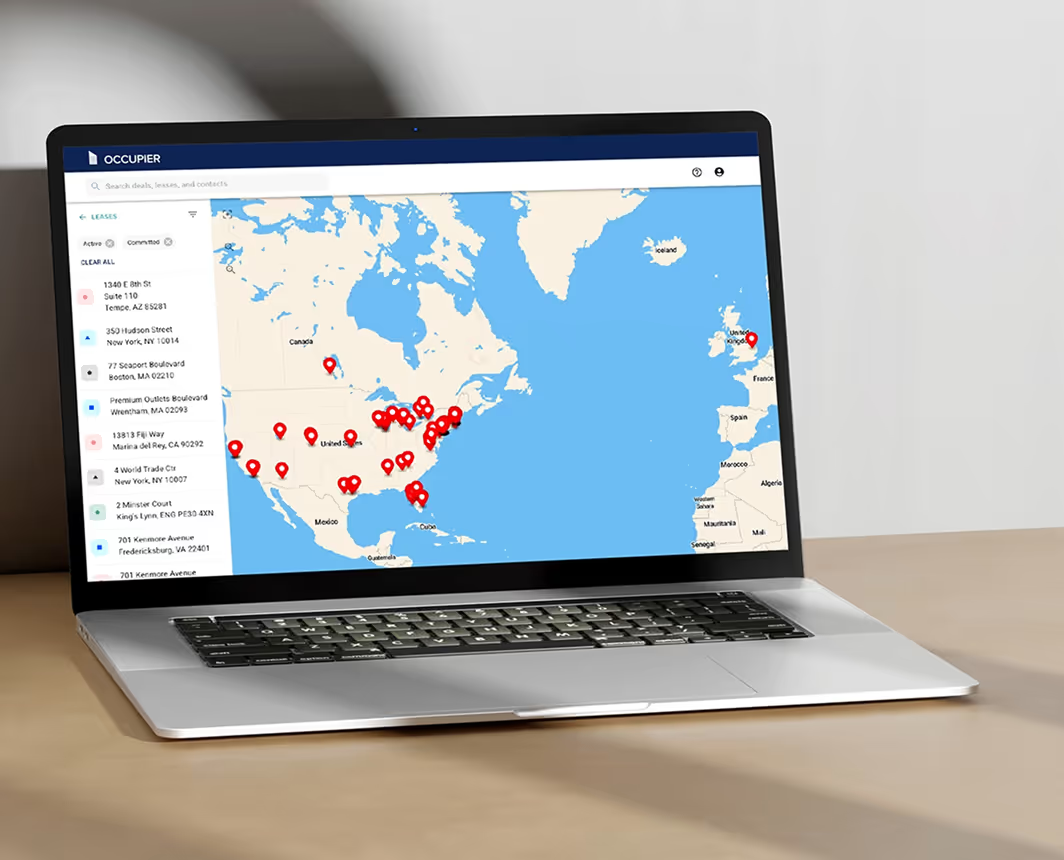
Occupier is purpose-built for commercial tenants. Real estate and finance teams work from the same lease data, compliance runs automatically, and nothing falls through the cracks because of a system that wasn't designed for your side of the lease.
Take a free product tour to see how it works for teams like yours.
Frequently asked questions
Can landlord software be used for ASC 842 compliance?
Yes, but typically with workarounds. Most landlord-first platforms treat ASC 842 accounting as a secondary module or reporting layer, which means calculations often require manual data exports and don't update automatically when lease terms change. The result is a compliance process that depends on finance maintaining a parallel Excel model rather than relying on the platform as the system of record.
What is tenant-first lease management software?
Tenant-first lease management software is built around the obligations and workflows of the tenant side of a lease: tracking critical dates, managing ASC 842 and IFRS 16 compliance, handling renewals and options, and giving real estate and finance teams shared visibility into the same lease data. The data model, default reports, and user workflows are designed for the party responsible for lease obligations, not the party receiving them.
How long does it take to migrate to a new lease management system?
Most migrations for mid-market tenants managing 30 to 200 leases take four to eight weeks from data export to go-live. The largest variable is data quality: clean, structured lease records with documented amendments import faster than portfolios where lease data is split across spreadsheets, shared drives, and a previous platform. Platforms with structured onboarding and data import tooling compress the timeline significantly.
What data do you need to migrate to a new lease accounting platform?
At minimum: lease commencement and expiration dates, rent schedules (base rent and escalations), renewal and option terms, amendment history, and ASC 842 classification for each lease. For a complete migration, you also need the prior period's ROU asset and lease liability balances for opening balance reconciliation. The cleaner and more complete this data is before import, the faster the validation step.
Is there lease management software designed specifically for commercial tenants?
Yes. Occupier is purpose-built for commercial tenants managing 30 to 200 locations, covering lease administration, ASC 842 and IFRS 16 accounting, transaction management, and critical date tracking in a single platform. Real estate and finance teams work from the same lease record, which eliminates the manual handoffs and data sync issues that come with running separate systems for each team.


Lease management that works for real estate and finance
15,000 sq ft
90 days notice
March 2026
Action required